The guide to live captioning for broadcast and streaming
Where captions join your chain decides the format, the delay and the work. A plain guide to 608, WebVTT and TTML, plus a reusable pre-broadcast checklist.
Most live captioning projects start with the wrong question. Teams ask which vendor, or which format. The question that decides everything else is simpler: where in your chain do the captions join the video?
Answer that first and the format picks itself. Delay becomes a setting instead of a surprise. Nobody has to rack a new box.
Skip it and launch week is where you find out that your packager drops half the styling, or that your HLS players never see the 608 you were told you had.
This guide is the reference we wish every broadcast and streaming team had before their first captioned stream. It covers how cloud captioning fits a workflow you already run, what the formats actually are, what drives accuracy and delay, and it ends with five questions and a checklist you can reuse before every broadcast.
Captions join your chain at one of five places
Every live chain has the same landmarks: a contribution feed, a transcoder, a packager, an origin, the players. SyncWords sits at one of five positions relative to them, and each position opens a different set of formats.
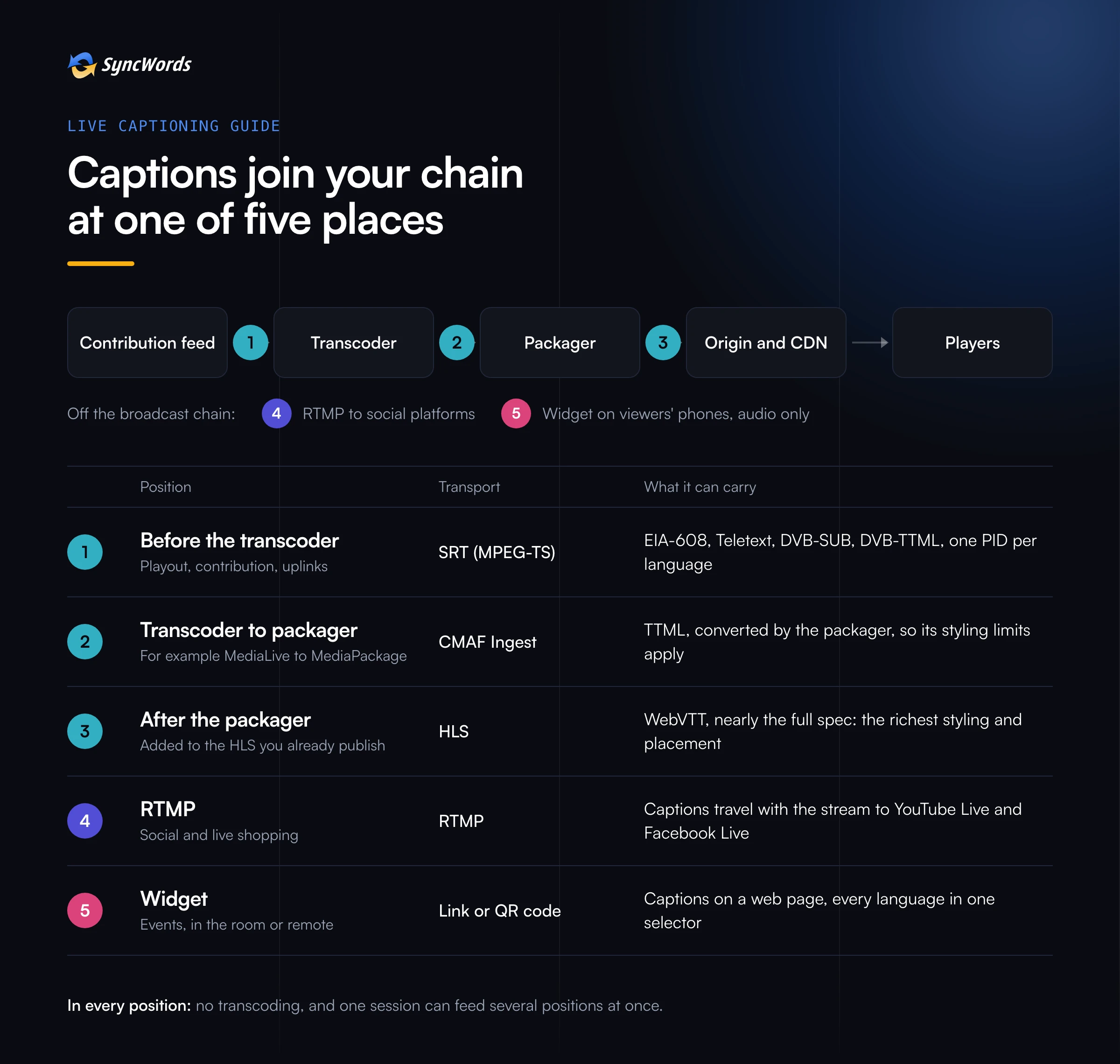
- Before the transcoder. Your feed reaches SyncWords over SRT as MPEG-TS, and the captions go back on the same transport stream. This is the full broadcast path: embedded EIA-608, Teletext (DVB-TXT), DVB-SUB and DVB-TTML, each language on its own labelled PID. It suits playout, contribution and any chain that ends at a multiplexer or a satellite uplink.
- Between the transcoder and the packager. The transcoder sends CMAF Ingest (or the older HLS Ingest) to SyncWords, which adds a TTML subtitle track and hands the stream on to the packager. AWS teams land here often, between MediaLive and MediaPackage. The packager converts our TTML to WebVTT, so only the styling that packager understands survives.
- After the packager, at the origin. SyncWords reads your existing HLS and writes WebVTT segments alongside it, without copying or republishing your video segments. Players get nearly the whole WebVTT spec, which makes this the position with the richest styling and placement.
- RTMP. Social and live shopping streams have no transcoder or packager to speak of. Captions travel with the RTMP stream to destinations such as YouTube Live and Facebook Live.
- The widget. No video at all. Viewers open a link or scan a QR code and read captions on their own phone. This is the events product, and audio alone is enough.
Two things hold in every position. The video is never transcoded, so picture quality, DRM and SCTE-35 markers pass through as they arrived. And one session can feed several positions at once: SRT back to your playout and a widget link for the people in the room, from the same captions.
Running on AWS? How to add live captions to AWS MediaLive without re-encoding walks through the middle position step by step.
You keep the stack you have
Cloud captioning does not mean ripping anything out. If you already own a hardware caption encoder, SyncWords can drive it over IP with a 608 feed, so you move at your own pace. If your captioners or steno software already produce a 608 feed, we can take that in over a direct Control-A connection and build subtitles from it. And if your team automates everything, the API lets you map one service per channel once, then start, stop and schedule it without touching the configuration again.
Caption formats in plain language
Formats come in two families. Some ride inside the video signal. Others travel as separate text or image tracks next to it.
EIA-608. You will also see it called CEA-608: same standard, the name followed the standards body. It is the North American line 21 format, born in analog TV. A small character set, a few rows of text, four caption channels (CC1 to CC4). It is what most US playout systems, decoders and hardware caption encoders expect. It covers the seven languages the standard supports, including English, Spanish, French, Portuguese and Italian.
CEA-708. The digital TV successor, with more services, fonts, colours and window placement. The detail that trips teams up: digital caption data carries 608 inside it for compatibility, and that is how SyncWords reaches a 708 chain. We write EIA-608, and a system that expects 708 receives our 608 inside it. CEA-608 vs 708: what broadcast teams need to know covers what that means for your decoders.
WebVTT. The text track format of HLS streaming. A plain file of timed cues that the player draws on screen, in its own caption menu. If your viewers watch in a browser, an app or a connected TV player, this is almost certainly what they see. JW Player, THEOplayer, HLS.js and Video.js all show it natively.
TTML. The XML timed-text family. In streaming it is the subtitle track inside CMAF. Its broadcast profile, DVB-TTML, is where European subtitling is heading: precise positioning and modern styling, with decoder support still catching up.
Teletext and DVB-SUB. The European broadcast workhorses. Teletext (DVB-TXT) is the most widely compatible across the set-top boxes already in homes, with a page number per language. DVB-SUB sends each subtitle as a bitmap, so any decoder can show it whatever fonts it has. That makes it the dependable choice for Arabic, Cyrillic, Chinese, Japanese and other non-Latin scripts.
The rule of thumb: match the format to the last device that has to understand it. A US playout chain wants 608. An HLS player wants WebVTT. A European set-top box wants Teletext or DVB-SUB.
Accuracy starts at ingestion
Accuracy starts at ingestion. With clean program audio and a custom ASR dictionary for your names and terminology, live captioning delivers best-in-class word accuracy. Because every translation is built from that transcript, dictionary quality carries into every subtitle and dub language.
In practice that means three things.
- Send program audio, not a room mic. On an MPEG-TS source you can pick the exact audio track by index or PID, and even specific channels within it. Pick the clean commentary or presenter mix, not the stadium bed.
- Load the dictionary before the broadcast. Presenter names, team rosters, sponsors, place names, acronyms. Dictionaries are unlimited, can be set as a default or per event, and stay attached to a programming type so the Tuesday show does not start from zero every week.
- Decide where a human belongs. The Caption Editor shows AI captions to an editor a set number of seconds before viewers see them, so someone can fix a name in that window. For the sessions that matter most, a human CART captioner can be booked through the same platform.
More on where AI and human captioning each fit: From traditional live captioning to AI-powered accessibility. And the usual reasons a captioned event goes wrong, almost none of them technical: Why live event captioning fails and how to make sure yours doesn't.
Delay is a setting you choose
Three words get mixed up in every captioning conversation, and they mean different things.
- Latency is how far the outgoing video runs behind the incoming video.
- Processing time is how long the pipeline takes to turn speech into a caption.
- Delay is what the viewer notices: the caption against the audio they are hearing.
The control between them is the buffer. Hold the video back a few seconds and the captions have time to catch up, so they appear with no perceptible delay. Keep the video tight and accept a short gap between speech and caption. Many broadcast teams choose the second.
The numbers depend on the position. The video path itself adds a half-second latency in SRT workflows, and with no buffer you get sub-2s caption delay in SRT. Typical captioning solutions display live captions within 4 to 8 seconds. On the HLS side, viewers typically see captions about 5 seconds behind the program audio in HLS workflows.
Translated subtitles take longer to produce than same-language captions, so a multilingual stream needs a bigger buffer. We size it with you per channel. The post on multilingual live subtitles covers that side.
Your obligations, our output
Broadcasters and public bodies caption because rules require it: FCC Title V, the ADA, the EU Accessibility Act (in effect since June 2025), and others depending on where you broadcast. SyncWords output is built to the FCC Title V criteria for accuracy, synchrony, completeness and placement, and it helps you meet the accessibility obligations that apply to you. Compliance itself rests with the broadcaster; our output is built to support it.
Placement is the criterion teams forget. On 608 you set the row and the number of lines. On Teletext you set the row and can use double height. On DVB-SUB, WebVTT and DVB-TTML you set the bottom margin. Use those controls to keep captions off your lower thirds and score bugs before the first broadcast, not after the first complaint.
Five questions to ask before you caption a live stream
1. Which caption format does each destination need? List every destination: playout, OTT app, website player, social. Write the format each one reads next to it. That list tells you which position you need, and whether one session should feed more than one.
2. Who checks the custom dictionary for names and terms? Give it an owner. Usually the producer or the person who writes the rundown. A dictionary nobody owns goes stale by the third show.
3. Which languages does your audience actually watch in? Look at your analytics, not your ambitions. Start with the two or three languages the data shows, and add more once you see them used.
4. How will captions reach every platform you stream to? One session can deliver to several places at once, and every delivery method carries every active language. Confirm each platform receives captions in a format it accepts before the day, not on it.
5. Who monitors captions during the broadcast? Someone should be watching the output on the real player or decoder, with a way to reach support. SyncWords support runs 24/7, and for events a live technician joins the session.
The pre-broadcast checklist
Print it, paste it into your runbook, reuse it every time.
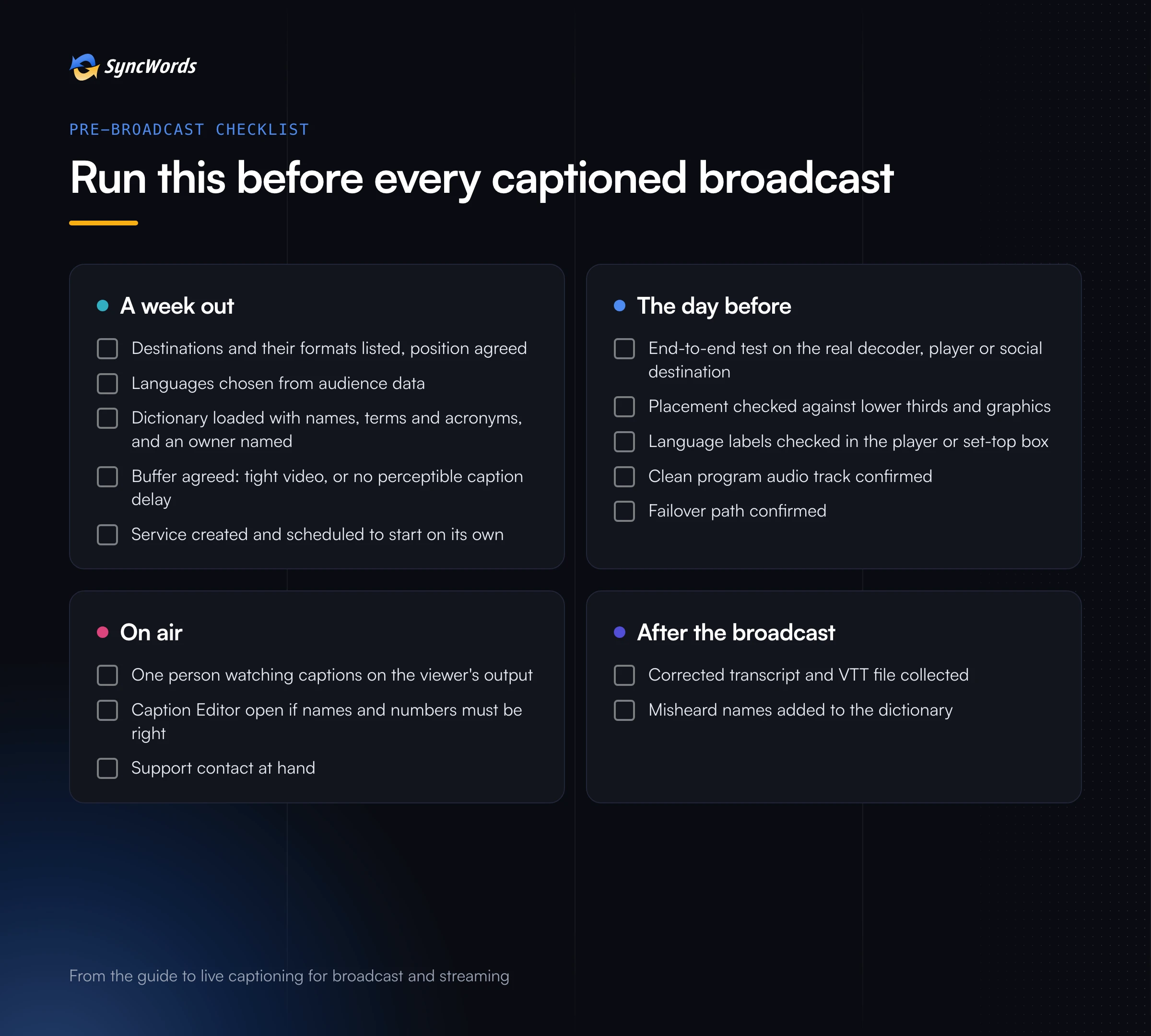
A week out
- [ ] Destinations and their formats listed, position agreed
- [ ] Languages chosen from audience data
- [ ] Dictionary loaded with names, terms and acronyms, and an owner named
- [ ] Buffer agreed: tight video with a short caption delay, or a few seconds of buffer and no perceptible delay
- [ ] Service created and scheduled, so it starts on time with nobody at the keyboard
The day before
- [ ] End-to-end test on the real decoder, player or social destination, not a preview window
- [ ] Caption placement checked against lower thirds and graphics
- [ ] Language labels checked in the player menu or set-top box selector
- [ ] Program audio track confirmed: the clean mix, at a healthy level
- [ ] Failover path confirmed
On air
- [ ] One person watching the captions on the viewer's output
- [ ] Caption Editor open if names or numbers must be right
- [ ] Support contact at hand
After the broadcast
- [ ] Corrected transcript and VTT file collected (they are generated automatically when the session ends)
- [ ] Misheard names added to the dictionary for next time
Where to go next
This guide is the hub. Three posts this month go deeper on the questions above:
- How to add live captions to AWS MediaLive without re-encoding, for teams on AWS Elemental
- CEA-608 vs 708: what broadcast teams need to know, for anyone whose decoders ask for 708
- One live feed, many languages, for adding translated subtitles to the same stream
For the transport underneath most broadcast workflows, see Secure Reliable Transport (SRT): the protocol powering low-latency live streams.
Want to see captions on your own feed, in the position that fits your chain? Book a demo: book a demo
See captions on your own feed
Book a Demo